Welcome to Tickiti
Tickiti is ticket management software that just works. It is built for support teams who want clarity without complexity — a clear inbox, fast actions, and a customer portal that replaces tangled email threads with a clean, professional experience.
Whether you are responding to customers, triaging incoming work, or coordinating across a team, Tickiti is designed to keep the tickets that matter to you in front of you, and everything else out of the way.
What Tickiti gives you
- A branded customer portal for raising and tracking tickets — no email thread confusion.
- Powerful, intuitive tools for staff to manage tickets and workload from day one, with built-in workflows you can customise.
- One-click quick actions for assigning, responding, escalating, and closing tickets.
- Built-in collaboration through staff notes, internal responses, and concurrent update control.
- An extensive REST API and intervention system that integrates Tickiti with the systems you already use.
Perspectives — your views into the queue
Every staff user sees the same underlying tickets, but the way those tickets are presented is shaped by perspectives. A perspective is a saved view that decides which tickets you see and the order they appear in. Built-in perspectives include Inbox, Active, All, Closed and Drafts; you can add your own to match the way you actually work.
For My Attention — your current workload
The most useful perspective when you are working live is For My Attention. It is the perspective designed to surface the tickets you specifically need to do something about — tickets assigned to you, tickets where someone has @-tagged you, urgent items in your inbox, and ones you have asked Tickiti to keep in front of you. It is your at-a-glance answer to “what should I be working on right now?”.
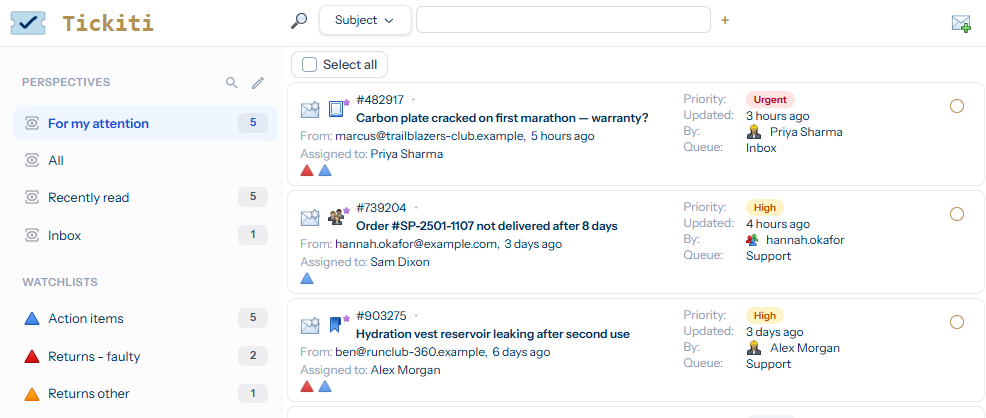
The screenshot below shows the ticket browser viewing the For My Attention perspective for Priya, a support agent at example supplier Sole Provider Inc. Five tickets are waiting on her — a warranty claim flagged Urgent, a delivery query and a leaking hydration vest both flagged High, and two normal-priority items. The perspectives panel on the left lets her switch views in one click; the count badge next to each name shows how many tickets currently match.
Where to go next
- Logging in — getting into Tickiti for the first time.
- The Tickiti interface — a tour of the screen.
- Using Perspectives — adding, removing and creating your own views.
- Your first ticket — responding to a customer end-to-end.